Office Chairs: Your Back Will Thank You
Invest in your health with office chairs designed by experts to prevent back pain and improve posture...
12 min


In some cases, the standing desk does not adjust its height, which could be confusing when there is no straightforward cause. That fact can raise doubts about technicalities or even power outages. These hitches are, however, not unusual when it comes to electrical devices
Often, we become so frustrated at a non-functioning desk that we overlook its intended convenience and functionality.
Still, do not worry because there is usually a simple answer to this situation. This guide will elaborate on why your standing desk won’t go up and discuss ways to fix the problem, ultimately returning it to the entire operation as before by maximizing utilization once more.
Let us help each other resolve this usual issue through troubleshooting and remediation steps.
Having your standing desk fail to adjust height can be a frustrating experience, disrupting your workflow and productivity. There are various reasons why your standing desk won’t go up, from power issues to mechanical malfunctions. Let’s figure out the causes and solutions.
Specific problems with adjustable height workstations crop up when things like shelves get laid on them, which might prevent their upward movement. Some come with built-in safety measures so they stop moving when they touch anything.
Any height-adjustable table can lift only certain weights maximum. It can quickly get overloaded if too many things are put there. If this happens, the desk tells you it can’t withstand the weight anymore and has turned off as a protective measure.
When purchasing a table, consider its lifting ability to prevent such situations from happening in the future. Ensure you know whether this figure relates to the base only or includes a worktop.
The actuator can handle higher loads without getting too hot or losing its power, thus preventing the desktop from rising back up when it should. However, do not exceed your table’s required weight capacity, which can decrease its service period.
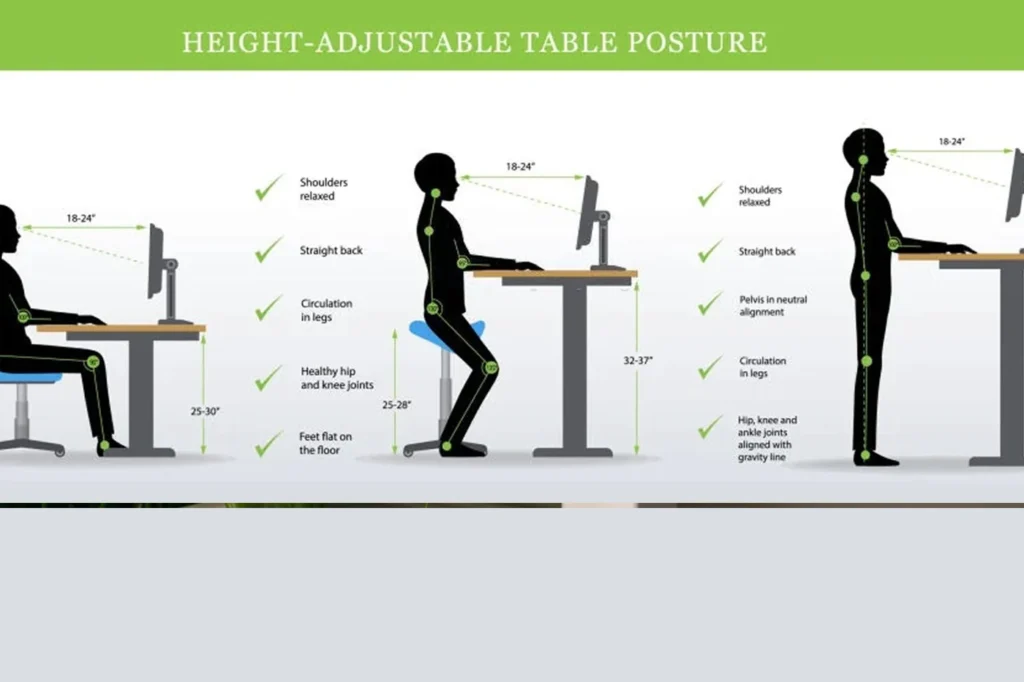
When one side of the table’s legs seems uneven, your tabletop becomes unmovable. That is typical if a two-motor desk is used.
If no solid mechanisms allow the engines to lock into position by themselves when height is supposed to remain constant, then both the spindle and motor could rotate simultaneously.
The other might move slower or faster than the first, even if one rotates while the other stands still. This causes desks to become uneven because motors get out of sync with each other.
Thus, there are two situations when an imbalance in leg length happens: firstly, this may cause your desk’s control box to find out that its feet are not the same size and will stop moving to prevent further damage.
On the other hand, if the control box of this desk is not intelligent enough to identify it, it will keep going down or up until there is too much friction in the columns of the legs. It will then get stuck and not move at all.
For some desks, you may have to complete a reset so that the legs can realign themselves to fix this issue with height-adjustable desk troubleshooting.
The trick here is to lower your table to its lowest level. After resetting itself, your table will become horizontal again.
This means that when a control box powers off after being turned on twice thrice, it cannot turn on until it has rested for a while; henceforth, this term is referred to as the duty cycle for such tables. Time taken by an active state of such a control box has been exhausted and would be required by any mandatory rest period to prevent its overheating from taking place; thus, do not panic if your workstation suddenly stops functioning.
Allow your control box to cool down for some time before making another attempt.
Some workstations have a duty cycle of 2 minutes ON and 18 minutes OFF. Therefore, give it an 18-minute break to function correctly after adjusting its height.
This is standard in the industry. This does not mean one cannot change levels more frequently; typically, no issues arise except in rare cases.
Anything hanging over the desktop might prevent it from moving upwards. Shelves mounted above are often culprits, along with cupboards hung on walls inside rooms like offices.
Similarly, some stand-to-sit desks feature collision detection systems, which prevent them from colliding with other objects. The desk will stop going up and quietly slide back down once it hits an object on its way, making enough space for you to remove the object in front of it.
Look under your desk to see if anything is blocking its path, and remove whatever it is.
This usually happens for two reasons: the desk was unplugged and then plugged back in, or the outlet lost power. After experiencing a loss and regain of control, a standing desk may go into reset mode. As long as the sit-stand table is in reset mode, it will only move downwards.
If your power recently went out and your standing desk won’t move, you need to do a reset. Use these guidelines if you want to troubleshoot height-adjustable desks. You should be able to return things to normal after doing that. Here are some ways to address issues with standing desks:
When power cords, motor cables or control box cables are dragged across things or jammed, the cable becomes loose. Frequently, cable bunching causes the tugging of wire.
A wire being pulled out of a socket might be only a little bit, but electricity will still be flickering on and off and off at times. It means that sometimes power can go through them while other times cannot go through them. When those desks get powered off, tables must reset to zero.
Reset your sit-stand workstation after checking that all cords are securely plugged in. You need to reset your workstation for this purpose. To prevent this from happening again, please refer to our standing desk accessories page, which offers products such as cable management kits.
Most desks come with an upper container stop, which allows users to set a maximum height so that the desk doesn’t crash into anything.
As such, instead of going up to 48 inches, the highest point can be adjusted to 40 inches. That way, when you have your sit-stand desk, raising it won’t damage other items like cupboards or shelves.
You’ll need to adjust or remove the upper container stopper to raise the table above the existing setting. Follow the manufacturer’s instructions for these adjustments.
https://www.youtube.com/watch?v=2e7rR7TL-PE
The big reason why your standing desk won’t go up In a nutshell (and How To Repair This)
Finding out why your standing desk got stuck might not be easy, as there are many possible reasons. Luckily, now you know the most common reasons that prevent your standing desk from moving up. Now, we assume you know how to lower your standing desk and program it.
If not, look at these two resources before doing anything else – they’ll help you use your desk safely and correctly.
From objects in the way to power outages – there can be many problems with moving your adjustable-height desk. But here are some of the most likely causes and solutions you can start investigating as soon as you realize it is not moving.
Either one of these familiar issues can solve what is entirely wrong or save time by phone with tech support if it’s an actual malfunctioning case.
A standing desk can be helpful in your office for several reasons; these benefits include:
Though it is beneficial, there are some negatives to the standing desk. Here they are:
A lack of features on the desk can lead to incorrect posture while using it for personal purposes.
It may take time before you get used to joining others and celebrating this new working method.
You know that sitting too much isn’t good for you, right? Well, so is STANDING TOO MUCH! Standing over extended periods causes pressure on specific areas that eventually swell up, causing joint or foot inflammation.
Now that you’ve learned how to adjust your workstation accordingly let us help you benefit fully from it:
When standing, avoid leaning excessively upon one foot; sit when either tired or soreness sets in.
Throughout each day, aim at having an equal duration between sitting and standing (50/50), gradually increasing your time spent in an upright position.
If productivity dips during prolonged bouts on your feet, simply sit down again.
Now you know the reason why won’t my standing desk go up? Inshort , if your standing desk refuses to move up, there could be various reasons behind the issue. It’s crucial to troubleshoot the problem systematically, starting with checking the power source, ensuring proper assembly, examining the control panel, and inspecting the mechanism for any obstructions or damage.
By following these steps and seeking assistance from customer support if needed, you can often identify and resolve the issue efficiently. Remember, investing in a high-quality standing desk from a reputable manufacturer can also mitigate potential problems in the future, ensuring a smoother and more reliable experience in the long run.
The following steps should help if your stand-up work area fails to rise:
Confirm power source: Double-check that your workstation is properly connected and powered.
Weight overload: Some desks are fitted with weight cut-offs; hence, kindly reduce the weight if you have overloaded the unit with other things.
Obstructions: Inspect the desk’s legs and devices for any objects blocking it from moving.
Here is how to unlock the standing desk; follow these guidelines:
Look for manual lock: There is a possibility that some desks might have manual locks meant for security purposes, for which you can find details about unlocking on their manuals.
Power cycle: If there isn’t any manual lock, perform a power cycle to fix the problem. Unplug the table from your power source for a few minutes before plugging it back in. Sometimes, this simple action can solve minor issues.
If all else fails, consider getting in touch with customer support of the manufacturer of your desk.
Standing desks typically utilize a hand crank mechanism to adjust the height of the desk surface. To raise or lower the desk, simply turn the crank in either direction. Some models may feature knobs instead of hand cranks, but the functionality remains the same.
Ensure ample room under the desk for your legs and feet, avoiding storage that may limit space. If the desk height is too low and cannot be adjusted, consider placing sturdy boards or blocks under the desk legs to raise it.
Standing for prolonged periods can be tiring, especially without comfortable footwear or supportive insoles. After a few hours, you may experience soreness in your feet. You may need to shift weight between your legs periodically.
Expert reviews, guides, and insights for your perfect setup